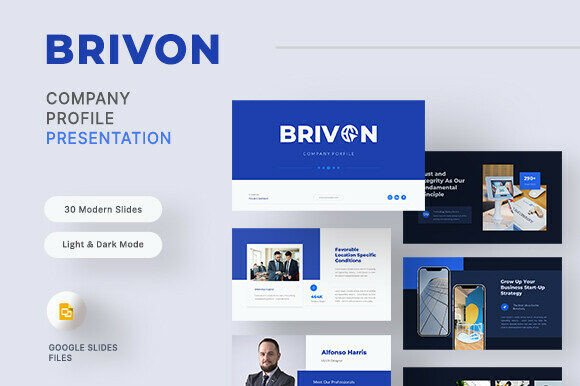
Brivon – Company Profile Google Slides
Brivon – Company Profile Google Slides is a versatile and professional template designed to help businesses showcase their identity with confidence and clarity. Whether you're launching a new startup, presenting your services, or updating your company overview, this template offers a clean, modern, and customizable solution that fits a wide range of needs.
With 30 fully editable slides, Brivon provides a comprehensive structure for any company presentation. From the welcome slide to the final closing, every section is thoughtfully crafted to guide your audience through your brand story, team, services, and more. The template supports both light and dark mode, making it adaptable to different environments and user preferences.
Why Choose Brivon?
One of the standout features of Brivon is its ease of customization. All elements—text, colors, images, and charts—are fully editable, allowing users to tailor the design to match their brand’s unique identity. This flexibility makes it ideal for professionals, startups, consulting firms, and anyone looking to create a polished and cohesive company profile.
The template is built using free fonts, which not only keeps costs low but also ensures a clean and modern look. Additionally, the use of master slides simplifies the editing process, enabling users to make global changes with just a few clicks. Picture placeholders are included, so you can easily insert your own images without worrying about layout issues.
Key Features of Brivon
- Total Slides: 30 slides for a complete company profile
- Light and Dark Mode: Adapt to different viewing environments
- Free Fonts: No additional costs for premium typefaces
- Master Slides: Streamline customization and consistency
- Editable Elements: Customize text, colors, and charts effortlessly
- Picture Placeholders: Easily add your own visuals
- Resolution: 16:9 Full HD (1920×1080 px)
- Quick Editing: Simple and intuitive design for fast creation
Practical Applications
Brivon is suitable for a variety of scenarios, from personal branding to corporate presentations. Entrepreneurs can use it to pitch their business ideas to investors or partners. Marketers might find it useful for client proposals or internal strategy sessions. Educators and trainers could leverage it to present case studies or business models in a visually engaging way.
For creative professionals, such as designers or developers, Brivon offers a clean canvas to highlight their portfolio and services. It's also a great tool for freelancers who want to showcase their expertise in a structured and professional format. In a digital environment, the template can be used to create dynamic presentations for webinars, virtual meetings, or online courses.
Benefits of Using Brivon
Using Brivon can significantly enhance your communication efforts. A well-designed presentation helps convey your message more effectively, making it easier for your audience to understand and remember key points. This is especially important in professional settings where first impressions matter.
The template’s focus on usability and efficiency means you can spend less time on formatting and more time on content. Its clean layout and organized structure ensure that your information is presented in a logical and easy-to-follow manner. This not only improves the user experience but also strengthens your brand’s professionalism.
From a branding perspective, Brivon allows you to maintain a consistent visual identity across all your materials. By customizing the colors, fonts, and imagery, you can reinforce your brand’s personality and values. This consistency helps build trust and recognition among your target audience.
How to Get Started
To get started with Brivon, simply download the Google Slides .PPTX file and open it in your preferred presentation software. The template comes with a documentation guide that includes download links for the free fonts used. This makes the setup process straightforward, even for users with limited design experience.
Keep in mind that while the template includes picture placeholders, the actual images used in the preview are for demonstration purposes only. You’ll need to source your own images or use stock photography that aligns with your brand’s style.
Real-World Use Cases
Consider a small consulting firm that needs to present its services to potential clients. With Brivon, they can create a professional-looking presentation that highlights their expertise, team members, and past projects. The infographic and chart slides can be used to showcase data-driven results, adding credibility to their offerings.
A startup founder preparing for a pitch event can benefit from Brivon’s structured approach. The welcome and about us slides set the tone, while the service and portfolio sections provide a clear overview of what the company offers. The mockup device slide is particularly useful for showcasing mobile applications or digital products.
For educational purposes, a business instructor might use Brivon to create lesson plans or case studies. The template’s flexibility allows for easy adaptation to different topics and teaching styles. It can also serve as a template for students to practice creating professional presentations.
Final Thoughts
Brivon – Company Profile Google Slides is more than just a template—it’s a powerful tool that empowers users to communicate their brand story effectively. With its balance of functionality, aesthetics, and customization options, it’s an excellent choice for anyone looking to create a compelling and professional presentation.
Whether you’re a seasoned professional or just starting out, Brivon provides the resources needed to make your company profile stand out. By focusing on real-world applications and practical benefits, it ensures that your message is delivered with clarity and confidence.